
First steps with your trackle cycle computer
The first steps are best taken together. That’s why we’ve summarized everything you need to know here when it comes to putting the trackle into operation.
We start at the very beginning with the first login, pairing your sensor and how to start measuring. We explain how to insert and remove the sensor, how trackle evaluates and explain your daily trackle routine.
Here's how you log in - step by step:
- Download the trackle app from the Apple App Store or the Google Play Store.
- Open the app and click on „Create new account.“ Enter your email address and click on „Next.“
- Now you will receive a passphrase – very important: write it down somewhere!
- Click on „Yeah“ and enter your passphrase in the next step.
- Click on „Next“ to log in and pair your sensor.
Here's how you pair your sensor - step by step:
After logging in, the app will prompt you to add a sensor. If you have an Android phone, besides enabling Bluetooth and internet, also activate location services and allow the trackle app to access your location.
Take the sensor out of its box and open the trackle app.
Place it back in the box to start the pairing process.
Your sensor will now blink three long times followed by two short blinks – it will then become visible in the app.
- Click on ‚Pair Sensor‘ – your sensor will then be registered and paired.
How and when do you start measuring?
1. After your menstruation, when the bleeding has stopped.
2. At the latest by day 5 after the first day of your menstruation.
Congratulations, you are now logged in and your trackle is ready to measure!
But when and how do you actually start?
Especially at the beginning, you should wear the sensor every night so that it can collect meaningful data. It’s okay if you don’t wear it for one night, but try to wear it every night if possible. Start measuring after your menstruation. The measurement should begin once the bleeding has subsided. You should start no later than the 5th day of your cycle, which is five days after the first day of menstruation.
Don’t worry: If you’re still bleeding lightly, you can use your trackle, for example, in combination with a pad.
How long do I have to measure each night? Can I remove the sensor in between?
To determine your basal temperature, trackle should be worn for at least 4 hours while you sleep. You can remove the sensor in between if you need to go to the bathroom or have sex. Trackle can simply exclude these short measurement breaks from the calculation.
Do you have any data from your previous menstruation?
If you have any data from your last menstruation available, you can enter it into the app before your first measurement. On the corresponding day, simply enter your flow strength.
How do you remove the trackle? - Tips and Tricks
In the morning after waking up, you remove the sensor. It might take some practice, but it gets easier with time. In a comfortable position, insert two fingers – preferably thumb and index finger – into the vagina and grasp the sensor at the bottom of its bridge.
Then simply pull it out!
What do you do if you can't remove the trackle?
Firstly, don’t panic!
The sensor cannot be lost, and you will definitely get it out.
One trick is to push it forward so you can grip it better. You can do this easily by applying a little pressure with your pelvic floor – similar to a bowel movement.
Another trick is to squat slightly, apply some pressure, and then try to grip it. Additionally, you can let gravity work for you by moving around a bit.
Sometimes, it helps to try again a little later.
TRACKLE REMOVAL TIPS & TRICKS
1. Don’t panic!
2. Apply a little pressure on the pelvic floor and push the sensor forward.
3. Push a little while in a squatting position, then reach for it.
4. Movement helps – let gravity work for you.
5. Try again later.
Your Daily trackle Routine
The daily routine actually starts in the evening: when inserting the sensor.
- Wash your hands and take the sensor out of the storage box. It should blink three times now.
- Check if the trackle is damaged anywhere - if you notice any deformation or damage, do not use it.
- Insert the trackle into the vagina like a tampon - when it's in the right position, you shouldn't feel it anymore..
- Now off to bed and good night! The sensor measures while you sleep.
- In the morning after waking up, remove the sensor: To do this, insert two fingers into the vagina in the most comfortable position and grip the sensor at the bottom of its bridge.
- Now clean the sensor with water and soap and dry it off.
Now it's time to transfer your data - here's how:
- Bluetooth and WLAN on.
- For an Android smartphone: GPS on.
- Open the trackle app and go to the yellow tab.
- Now place your trackle in the storage box with the recessed grip facing upwards. The sensor will now flash twice.
- Wait until the sensor has synchronized.
- Observe your cervical mucus several times during the day and always enter the highest quality you were able to observe in the app.
- The sensor and app will do the rest!
This is how you clean your trackle
Clean your trackle directly after removal, before transferring the temperature to the app, with plenty of water or use a little soap. However, when using soap, make sure no soap residue remains on the outer surface.
It is important not to use aggressive cleaning or abrasive agents to clean your trackle. If necessary, you can disinfect your trackle, but it’s not mandatory. Please refer to the cleaning instructions in the user manual for guidance.
This is how you observe cervical mucus
To evaluate your cycle, trackle needs your entries for cervical mucus. Here you can read again what exactly cervical mucus is and where it comes from.
Observe your cervical mucus several times a day and take a close look at it: What does it look like? Is it perhaps slippery or slippery? What color is it? How does the vaginal entrance feel? Is it dry, moist or maybe even wet? You can start directly after removing the trackle in the morning. Enter your observations directly into the trackle app. You can now view your current fertility status in the turquoise tab of the trackle app.
As your cervical mucus can change throughout the day, it is important to monitor it several times a day. Our tip: Simply wipe your vaginal entrance with a clean finger or a piece of toilet paper before each visit to the toilet and check whether you find any cervical mucus. If you notice later in the day that the quality of your cervical mucus has improved, correct your information directly in the app and then check your fertility status again.
In this video you will find another explanation of the individual abbreviations in the app:
When does trackle evaluate: Predictions and Analysis
trackle evaluates based on the rules of the symptothermal method. Every day, trackle checks with the help of your cervical mucus and basal temperature inputs where you are currently in your cycle and whether your ovulation has already occurred or not.
For the evaluation of your cycle, trackle therefore needs your inputs regarding cervical mucus, menstrual data, and basal temperature. Your ovulation has occurred when your body reaches the temperature rise and when your cervical mucus changes from the very best quality back to poorer quality.
You can also read the exact rules here.
This is what your first cycle looks like BEFORE evaluation.
In the first cycle, trackle doesn't have any data from your cycle yet and therefore initially shows 'Today is a fertile day' - until enough information/data about the cycle is collected to calculate your ovulation. Every day, trackle checks your inputs on cervical mucus, menstruation, and basal temperature to determine if your ovulation has already occurred. For the evaluation of your cycle, trackle needs your inputs regarding cervical mucus, menstrual data, and basal temperature. Once ovulation has been determined according to the rules of the symptothermal method, the display in your app will change accordingly.
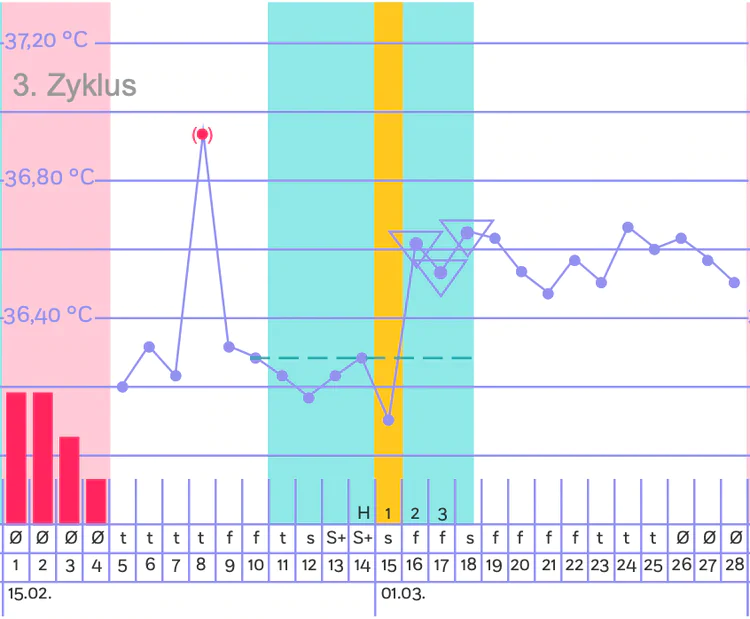
This is what your cycles look like AFTER trackle has detected ovulation.
Once trackle has evaluated your temperature rise and peak cervical mucus, your ovulation will be indicated. The turquoise-highlighted days around your ovulation show when you were actually fertile. The yellow color marks the day of ovulation. Additionally, from your 2nd cycle onwards, trackle provides a cycle forecast as lightly shaded colors in the calendar view on the purple tab. This forecast indicates when your ovulation is likely to occur in the next cycles. Important: the forecasts are not a basis for contraception! If you use trackle for contraception, please check your fertility status every day on the start screen (turquoise tab of the app). Only the current, day-specific display should be the basis for your contraceptive decision!
What's the point of having forecasts in the app if they're not for contraception?
The forecasts are meant for guidance and help you recognize in advance when you’re likely to be fertile and when not – also when your period is likely to occur. This can be helpful for planning (especially for family planning) or if, for example, you’re traveling and want to know if you can expect your period to come soon.
BUT: Forecasts are not 100% predictions of the cycle, they’re just forecasts.
The fertile window - when exactly are you fertile?
The egg can only be fertilized for 12 to a maximum of 18 hours after ovulation.
However, the body has a clever way to extend this period: Around ovulation, cervical mucus changes its consistency due to the hormone estrogen – it becomes stretchy and increasingly resembles the appearance of egg whites. This egg white-like cervical mucus changes the pH value of the vagina and allows sperm to survive in the female body for up to 5 days.
You are actually fertile only in your fertile window, which is 4 days before ovulation, on the day of ovulation itself, and 2 days afterwards.
Disruptive factors
When using trackle, it’s also important to ensure correct entry of disruptive factors. As you already know, your basal temperature rises by at least 0.2°C after ovulation. This increase is caused by the hormone progesterone and lasts until the next menstruation. This is also referred to as a temperature rise. However, certain circumstances can cause your core body temperature to temporarily rise even though ovulation has not yet occurred in the cycle.
In this article, we explain what these circumstances might be, when to enter them into the trackle app – and why evaluation with trackle is still safe despite elevated temperatures before ovulation: Learn more.